
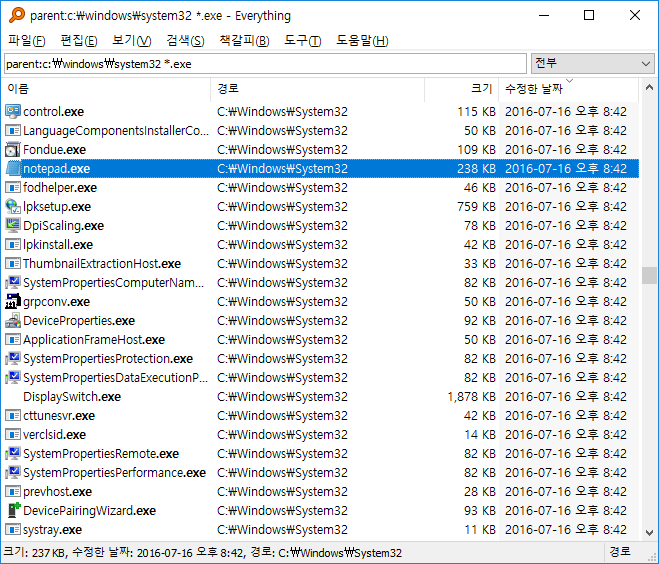
<span style="color: rgb(33, 37, 41); font-family: 'Pretendard JP', Pretendard, -apple-system, BlinkMacSystemFont, 'Apple SD Gothic Neo', 'Noto Sans KR', 'Noto Sans CJK KR', NanumBarunGothic, Roboto, 'Segoe UI', 'Malgun Gothic', 'Apple Color Emoji', 'Segoe UI Emoji', 'Segoe UI Symbol', sans-serif, emoji; font-size: 15px; font-style: normal; font-variant-ligatures: normal; font-variant-caps: normal; font-weight: 400; letter-spacing: normal; orphans: 2; text-align: start; text-indent: 0px; text-transform: none; widows: 2; word-spacing: 0px; -webkit-text-stroke-width: 0px; white-space: normal; background-color: rgb(255, 255, 255); text-decoration-thickness: initial; text-decoration-style: initial; text-decoration-color: initial; display: inline !important; float: none;">PC의 모든 파일을 매우 빠르게 검색할 수 있는 프로그램이다. F2를 누르면 이름 일괄 변환도 가능하다.</span>
<span style="color: rgb(33, 37, 41); font-family: 'Pretendard JP', Pretendard, -apple-system, BlinkMacSystemFont, 'Apple SD Gothic Neo', 'Noto Sans KR', 'Noto Sans CJK KR', NanumBarunGothic, Roboto, 'Segoe UI', 'Malgun Gothic', 'Apple Color Emoji', 'Segoe UI Emoji', 'Segoe UI Symbol', sans-serif, emoji; font-size: 15px; font-style: normal; font-variant-ligatures: normal; font-variant-caps: normal; font-weight: 400; letter-spacing: normal; orphans: 2; text-align: start; text-indent: 0px; text-transform: none; widows: 2; word-spacing: 0px; -webkit-text-stroke-width: 0px; white-space: normal; background-color: rgb(255, 255, 255); text-decoration-thickness: initial; text-decoration-style: initial; text-decoration-color: initial; display: inline !important; float: none;">윈도우 내장 검색과 달리 파일, 폴더 이름만 을 검색 대상으로 삼으며, 색인 데이터베이스를 만들어 읽어 들이는 방식이라서 검색 즉시 결과가 나온다. </span>
<span style="color: rgb(33, 37, 41); font-family: 'Pretendard JP', Pretendard, -apple-system, BlinkMacSystemFont, 'Apple SD Gothic Neo', 'Noto Sans KR', 'Noto Sans CJK KR', NanumBarunGothic, Roboto, 'Segoe UI', 'Malgun Gothic', 'Apple Color Emoji', 'Segoe UI Emoji', 'Segoe UI Symbol', sans-serif, emoji; font-size: 15px; font-style: normal; font-variant-ligatures: normal; font-variant-caps: normal; font-weight: 400; letter-spacing: normal; orphans: 2; text-align: start; text-indent: 0px; text-transform: none; widows: 2; word-spacing: 0px; -webkit-text-stroke-width: 0px; white-space: normal; background-color: rgb(255, 255, 255); text-decoration-thickness: initial; text-decoration-style: initial; text-decoration-color: initial; display: inline !important; float: none;">기본 설정 값을 기준으로 하드디스크에 부담을 줄 정도로 색인 작업을 하지 않는다.</span>
<span style="color: rgb(33, 37, 41); font-family: 'Pretendard JP', Pretendard, -apple-system, BlinkMacSystemFont, 'Apple SD Gothic Neo', 'Noto Sans KR', 'Noto Sans CJK KR', NanumBarunGothic, Roboto, 'Segoe UI', 'Malgun Gothic', 'Apple Color Emoji', 'Segoe UI Emoji', 'Segoe UI Symbol', sans-serif, emoji; font-size: 15px; font-style: normal; font-variant-ligatures: normal; font-variant-caps: normal; font-weight: 400; letter-spacing: normal; orphans: 2; text-align: start; text-indent: 0px; text-transform: none; widows: 2; word-spacing: 0px; -webkit-text-stroke-width: 0px; white-space: normal; background-color: rgb(255, 255, 255); text-decoration-thickness: initial; text-decoration-style: initial; text-decoration-color: initial; display: inline !important; float: none;">단 부팅 후 처음 작동했을 시, 데이터베이스를 읽어 들이는 시간이 약간 필요하며, 검색 결과가 많은 상태에서 정렬 방식을 바꿀 경우 시간이 오래 걸릴 수 있다. </span>
<span style="color: rgb(33, 37, 41); font-family: 'Pretendard JP', Pretendard, -apple-system, BlinkMacSystemFont, 'Apple SD Gothic Neo', 'Noto Sans KR', 'Noto Sans CJK KR', NanumBarunGothic, Roboto, 'Segoe UI', 'Malgun Gothic', 'Apple Color Emoji', 'Segoe UI Emoji', 'Segoe UI Symbol', sans-serif, emoji; font-size: 15px; font-style: normal; font-variant-ligatures: normal; font-variant-caps: normal; font-weight: 400; letter-spacing: normal; orphans: 2; text-align: start; text-indent: 0px; text-transform: none; widows: 2; word-spacing: 0px; -webkit-text-stroke-width: 0px; white-space: normal; background-color: rgb(255, 255, 255); text-decoration-thickness: initial; text-decoration-style: initial; text-decoration-color: initial; display: inline !important; float: none;">메모리에 여유가 있다면, 자주 쓰는 정렬 방식을 미리 색인 해 놓도록 설정을 바꿀 수 있다.</span>
콘텐츠를 불러오는 중..
댓글목록
등록된 댓글이 없습니다.